Showing posts with label MCE2005. Show all posts

Saturday, December 13, 2008

Maplin have RF MCE Keyboard with Built-in touchpad for 30 quid (£29.99) - UPDATE BACK IN STOCK as of 2nd April 2009 but now £49.99

Recently when asked what wireless keyboard I would recommend for Media Center use I have been mentioning the RK-278 MCE Keyboard from Maplin here in the UK. I really like these keyboards they have a good full size keyboard which balances nicely on your lap; a good selection of media center specific keys and most significantly a built-in touchpad. For those of us using Laptops day in day out this is just so much easier to get on with than the joysticks or trackballs that usually inhabit these al in one input devices. So even though they retailed at around 60 quid I thought the extra functionality worthwhile over other cheaper competitors. Now, in time for the holidays, Maplin have dropped the price to just under 30 quid - which is a bargain.

I think this offer is in store only as i can't find the keyboard listed on the website and my local store did not have many left.

They also currently have a rather neat RF based Media Center remote for sub 20 pound as well. CORRECTION: this is actually an infraed remote not RF (I'm sure it said RF on the shelf)
Tuesday, April 03, 2007

MCE2005: Microsoft Karaoke Add-In

Don't know how I'd missed this before but I was browsing Microsofts list of Genuine Advantage offers and came across this:


Windows Genuine Advantage Special Offers > Offer Details
Media Center Karaoke Plug-in
Media Center Karaoke Plug-in is designed for Microsoft Windows XP Media Center Edition. Media Center users can use this plug-in to select audio channels when playing VCD or DVD, can display lyrics included in WMA or MP3 music files, can remove vocals from the song, can also control microphone connected to the PC. With this plug-in, the user can enjoy Karaoke experience in Media Center using popular audio/video media files, e.g. WMP3/WMA, not necessary depend on special Karaoke media files or special devices.


--------------------------------------------------------------------------------
System Requirements
The following hardware and software are required to run Media Center Karaoke Plug-in:

Windows XP Media Center Edition 2005 or above


Click here for download page

Friday, October 27, 2006

Tip: A great source for dvdid.xml files

If you use the MyDVD's feature in Media Center (and if that doesn't mean anything to you then take a look at http://thegreenbutton.com/forums/thread/77389.aspx) then you will know how difficult it can be to find the right dvdid.xml files for your dvds. Help is at hand - DVDxml.com currently catalogs over 15,000 DVD Titles (currently Region 1 only) and their dvdid information.

Thursday, October 12, 2006

TIP: UK SKY Satellite in MCE (also TopUp-TV)

Head on over to http://thegreenbutton.com/forums/thread/143671.aspx for news on how to get SKY including encrypted channels in Media Center.

Its also worth noting that the supplier mentioned in this post also has a solution for TopUp-TV on UK Digital Terrestrial

Thursday, September 21, 2006

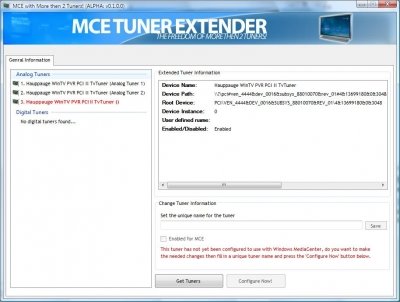
Tip: More than two tuners - Ramon Van Bruggen is a star

As you may know Media Center Edition natively supports a maximum of two tuners (well 3 if you also have an over the air HDTV card in the US)


For quite a while there have been a number of forum posts around the web (particularly on the Green Button) with walk throughs of a complex procedure to add more tuners, these have been beyond the average mortal though.

Thankfully Ramon Van Bruggen is about to change that with what like it may become the ultimate utility for adding more than one tuner. Its in early beta but is progressing very nicely.


Head on over to http://mce.ramonvanbruggen.nl for more information and to join the beta programme.

Wednesday, July 26, 2006

Fixes - July Rollup out for Media Center 2005

On his blog Matt Goyer notes:

You don’t have to wait for Vista for some bugs to be fixed. Get the July rollup for fixes to Media Center 2005. What does this fix?

Horizontal white lines appear when playing a DVD
Media Center may crash when using the ListMaker SDK sample application
Media Center may crash when you open a menu page
A black screen appears when trying to play a DVD

There more details in the kb article


I've seen the white lines problem on a colleagues PC so I'll be able to check that fix out later today.

Good to see that in all the rush to the Vista version 2005 users haven't been forgotten.

Tuesday, July 18, 2006

Sort Album Art by Artist in Media Center 2005


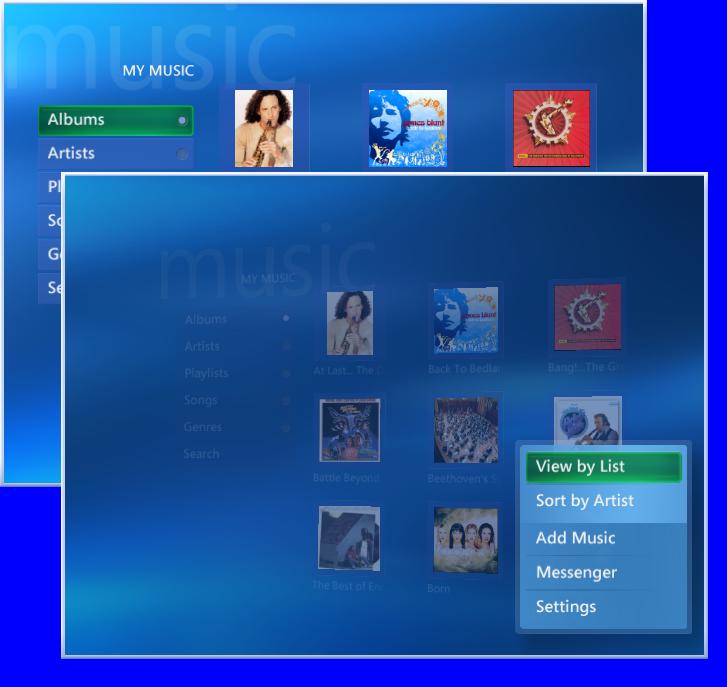
One of the new features in Vista is a view for music that shows Album Art grouped by Artist. This has attracted a great deal of attention but I've been surprised by how few people know you can do something similar in the 2005 version of Media Center.

The trick is to press the more info button when you have Albums highlighted in the menu on the left-hand-side of the Music view. If you do this you will get a pop-up menu that includes options to view by list and sort by Artist.

Selecting Sort by Artist will do exactly that and your Album Art will appear sorted by Artist. Its not as clever as Vista, however, and no grouping of albums takes place but it still can be useful.

You can change back by repeating the above process where you will find the More Info menu will have changed to include Sort Alphabetically.

If you have any tips you think user may not know. Please let me know.