Showing posts with label Decoder Utility. Show all posts

Tuesday, April 14, 2009

Announcing MCDU – The Media Center Decoder Utility (replaces VMCD)

For Vista, TV Pack and Windows 7

Download  at http://www.whittakermoore.com/mcdu.exe

image 

A couple of big new features.

  1. Take Ownership: To work round the issues with codecs being secure in Windows 7 and in some versions of Vista with TV Pack installed this option will take ownership of the default codec files and rename them to a .mcdu.bak file if you choose a non-standard codec If you then choose to go back to the standard decoders the utility will rename them back..

WARNING CHANGING THE DEFAULT MICROSOFT CODEC FOR LIVE TV CAN BREAK OTHER APPLICATIONS. RECOMMENDED ONLY FOR A PURELYMEDIA CENTER SETUP

  1. Show decoders not named video or audio. By default MCDU will show all codecs that have Video Decoder or Audio Decoder in the title – even if they are not marked as Media Center decoders. By checking this option al other decoders will be included. Use at your own risk.

image

If you are running Windows 7 Take Ownership will be checked at start up.

image image

IMPORTANT IF YOU HAVE ALREADY RENAMED THE DEFAULT MICROSOF CODEC FILES THEN THE AUTO RENAMING WILL NOT WORK. RENAME THEM BACK BEFORE USING THE UTILITY.

And finally the holy grail…. FFDSHOW being used for live tv in 7 Media Center. To get FFDShow to recognise Live TV you will need to enable the MPEG in AVI option.


Download  at http://www.whittakermoore.com/mcdu.exe

32 bit decoders have been tested. Its been coded to work with 64 bit but I’ve not been able to test it and I am not aware of any working 64 it decoders for TV other than the MS ones

Use at your own risk but I hope you find this useful

Garry.

p.s. almost forgot for TV Pack users you will now see tow decoders listed for both Video and Audio. This is because the TV Pack allows for a fallback decoder for formats the main decoder cannot work with.
Friday, May 23, 2008

Reminder: How to use decoders that do not show up in the VMCD utility


One of the comments that commonly appears in posts about my VMCD utility is "How do i get X decoder to show up in your utility"

For decoders that are XP Media Center compatible this has been explained in this post:

http://thedigitallifestyle.com/cs/blogs/garry/archive/2007/03/21/tip-using-non-mce-compatible-decoders-with-my-vista-media-center-decoder-utility.aspx

I am also working on adding some of the more common but non MCE Compatible codecs such as FFDShow - more later on that

Thursday, January 31, 2008

Stiil here

Although you may doubt it even further I am still about.

Hopefully sometime soon I will be back posting and am hoing to start with how to get ffdshow working with VMCD.

Before I vanish again a quick tip on tracking down Extender configuration errors. If you get a configuration error when adding a new Extender then take a look in the Media Center section of the event viewer (System Tools) you will probably see an error with an error code a a link for web-help on this error. Rather remarkably this web help can be very helpful at diagnosing the problem.

Thursday, July 19, 2007

Sorry no 64bit Vista decoder utility

I've tried valiantly. I've scoured registry dumps that readers have kindly sent in. I've analysed all the relative entries - I've even worked out where a 64 bit version of my decoder utility should post the entries. The only problem is that my current 32 bit app is posting in the right place. Unfortunatley the issue is not in this case getting the entry in the right place its the fact that the decoders themselves are not installing properly for 64 bit operation. This is not easilly worked round if possible at all.

So I'm very sorry to disappoint you 64 bit users - I did try...

Thursday, August 03, 2006

My Vista Decoder utility and UAP/UAC

Vista has this great feature formerly known as User Account Protection (UAP) and now known as User Account Control (UAC) which is designed to protect you from malicious code. Because of my issues with Activation (see post below) I have this turned off so I had forgotten when I wrote my decoder app about a little thing called virtualization.


Now UAC doesn't think its a good idea to let nasty apps write into the Local machine area of the registry (very wisely) and therefore has a clever trick that when they do it redirects that write to another virtual area of the registry. Basically this means that legacy applications do not fail when they write and read the Local machine area of the registry but they don't actually update the local machine setting.

The decoder settings are in the Local machine area of the registry so, suprise suprise, if UAC is turned on you will find my decoder utility doesn't actually do much.

So the bottom line is, for now, you will have to temporarily turn off UAP/UAC using msconfig (details in an earlier post) prior to using the decoder utility to get it to work.

Friday, July 28, 2006

Vista Media Center Decoder utility


In my post below Vista Media Center changing default decoder I mentioned I was working on something to make the process of changing the default MPEG-2 Video and Audio decoders in Vista a little easier.

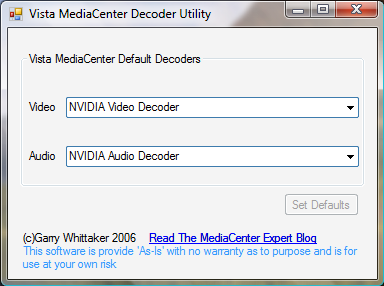
Well here it is the Vista Media Center Decoder utility. This utility will show you the current default decoders, let you select an alternative from a list of installed decoders and by pressing Set Default change the defaults. Although I wouldn't necessarily recommend it, you can even select a Video Decoder from one provider and an Audio Decoder from another.

Use at your own risk but it worked for me.

Download Utility - note you must save this program locally.

Update - This application requires .net Framework v2

Vista Media Center - Changing the Default MPEG-2 Decoder

I've been playing quite a bit with and like the new beta of Media Center on Vista.

One of the nice things Microsoft have done which will make life a lot easier is to include an Mpeg-2 Decoder with every copy of Vista. This is the bit of software that makes it possible to watch DVD's and view Live and Recorded TV. Those of you who have built your own Media Center Edition PC's using 2005 will know this is a big deal as previously you would have had to buy a decoder from a third-party like Nvidia or Cyberlink.

So all in all a good thing. Wait though, what if you like something the third party decoder does for you? Perhaps it has more settings than the default decoder. Maybe it handles sound better. You would probably guess you could just install your old decoder and Media Center would use that.

Hmmm not exactly!

I've been having performance issues with the default decoder so I thought I would try the Nvidia one instead (I have an Nvidia graphics card and prevously the nvidia PureVideo encoder has worked better with it than the Cyberlink one)

So I installed the Nvidia Encoder opened Media Center, played recorded TV and... no difference. Fair enough I thought maybe my hardware is just not up to Vista but then I realised that the Nvidia icon wasn't showing in the system tray which it usually would when playing video.

After doing some digging I discovered that Vista was still using the Microsoft decoder. Ok I thought, in XP you could use the Microsoft XP Decoder Checkup utility to change the default codec. So, wondering if it would work in Vista, I downloaded ran that utility and... the Nvidia was set as the default decoder - duh!

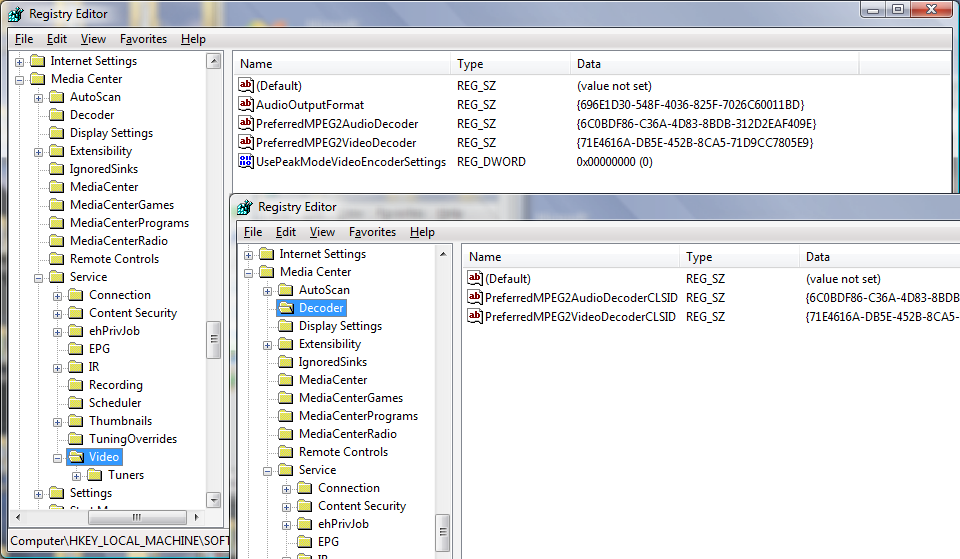
To cut a long story short Vista media Center stores its default decoder settings in a different place in the registry to XP.


In vista they are in HKEY_LOCAL_MACHINE\SOFTWARE\Microsoft\Windows\CurrentVersion\Media Center\Decoder whereas in XP they were in
HKEY_LOCAL_MACHINE\SOFTWARE\Microsoft\Windows\CurrentVersion\Media Center\Service\Video

The actual key names are the same
PreferredMPEG2AudioDecoder and PreferredMPEG2VideoDecoder

The Nvidia install had populated the old XP values, so it was a 'simple' matter of copying the values from Service\Video to \Decoder using the registry editor and away I went. The Nvidia icon popped up when I played Recorded TV and there was an improvement in playback.

Now I am not going to suggest that anyone modifies their registry. Modifying the registry is a risky business and you could prevent your PC from working.

But I am working on something which will make this process a whole lot easier...